 Nostreon
Derek Ross
October 19, 2026
How I Edited Nostr Valley's Videos With AI, Without Opening a Video Editor
Three camera files, four and a half hours of footage, ten finished videos with speaker cards and captions. I had no idea how to do it. Here are the prompts, the tools and the process I used with Claude Code, so you can do it too.
Every year after Nostr Valley, I lose a weekend to the videos. In past years I opened the footage in Shotcut, scrubbed through hours of video to find where each talk started and ended, cut them apart by hand, dragged a title image onto the front of each one, and exported them one at a time.
This year the camera gave me three files on an SD card. Four and a half hours of continuous footage. Eight talks, a welcome and a panel, and I wanted each one as its own video with an intro card showing the speaker's photo, name and talk title.
I honestly didn't know how to do most of that without Shotcut. I'd heard of ffmpeg and used it with some scripts in the past, but I'd never written an ffmpeg filter. I didn't know how to find the talk boundaries without watching the whole thing. So I asked Claude Code, the AI coding agent I use in my terminal, whether it could help.
From the first prompt on Sunday night to ten finished videos on Monday morning, the only footage I watched was a couple of test clips. Most of the time the computer was copying, transcribing or rendering in the background while I did other things. This post walks through exactly how it went, with the prompts I used, so you can do the same thing for your meetup, conference or podcast.
What I ended up with
- Ten videos: the welcome, eight talks and the panel, cut at the right moments
- A branded speaker card at the start of each one, built from each speaker's Nostr profile, that crossfades into the talk
- Loudness-normalized audio
- A captions file (
.srt) for every video - A summary, YouTube description with chapter timestamps, Nostr post and X post for every video
- A full transcript of the event, which also became the source for my event recap post
No paid software. Everything ran on my laptop (an Intel Core Ultra 5 with integrated graphics, running Omarchy Linux).
The tools
Claude Code did the thinking and typing. The actual work was done by free, open source tools, most of which I already had installed:
- ffmpeg cuts, joins, crossfades, normalizes audio and encodes video
- faster-whisper turns speech into a timestamped transcript, running locally
- Chromium in headless mode renders the speaker cards from an HTML template
- ImageMagick builds contact sheets so a whole set of images can be checked at a glance
- nak fetches each speaker's Nostr profile (name and photo)
- mpv for the few spot checks I did myself
The only thing I had to install was faster-whisper. Claude set it up in its own Python environment.
Step 1: Describe the outcome, then ask for a plan
Here's the first message I sent, tidied up a little. You don't need to know the right technical words. You need to know what you have and what you want:
We just finished Nostr Valley. The event website's code is in
~/Projects/nostrvalley, and it has the schedule and the speaker list. I have three video files on the SD card I just plugged in. The recording starts about 17 minutes into the first file, and each talk runs roughly 20 to 25 minutes.I need each talk split into its own video. Each one should open with an intro card showing the speaker's profile photo, name and talk title, then fade into the talk.
Can you do this? What tools would you use, and do we need to install anything? I've used Shotcut in the past. Do I need to watch the footage and find the timestamps myself, or can you handle that?
Claude didn't start editing. It went and looked first, and came back with a plan:
- It read the Nostr Valley website code and found the schedule, the speaker list with npubs, and the talk titles.
- It probed the three camera files with
ffprobeand found that they were one continuous recording, split by the camera every two hours. - It read the recording start time out of the file metadata. The first file started at exactly 11:45 AM, when the doors opened, so it could map the schedule onto the footage.
- It checked which tools were installed. ffmpeg was there with Intel hardware encoding, Chromium was there, and the Whisper install I had was broken.
- It answered my last question: no, I didn't need to watch the videos myself. It would transcribe the audio, find the handoffs between speakers in the transcript, and check video frames at each cut.
It also gave me three options for the card (full-screen card that crossfades into the talk, card overlaid on the opening seconds, or card plus a lower-third name tag) and asked which talks to include. I picked the full-screen crossfade.
What I learned: describe the result you want and the materials you have, and ask what it needs. Point it at real data (the website repo, the SD card) instead of describing that data yourself. And ask for a plan before asking for work.
Step 2: Build the speaker cards from data you already have
Every speaker already had a Nostr profile with a name and a photo, and every talk title was already in the website code. Claude used nak to fetch each speaker's profile (kind 0), downloaded the photos, and cropped them square:
nak req -k 0 -a <hex-pubkey> wss://relay.damus.io wss://relay.primal.net
For the design, it read the lineup graphic from the website, sampled its colors (the dark navy background, the cream text, the violet accents) and font, and wrote a small HTML template that matched it. Then it rendered one card per talk with headless Chromium:
chromium --headless=new --window-size=1920,1080 \
  --screenshot=01-seth.png 01-seth.html
That gives you a pixel-perfect 1920×1080 PNG from plain HTML and CSS, which is much easier to get right than placing text by hand in an image editor. When the first two cards looked right, it rendered all ten and made a contact sheet so I could check them in one image:
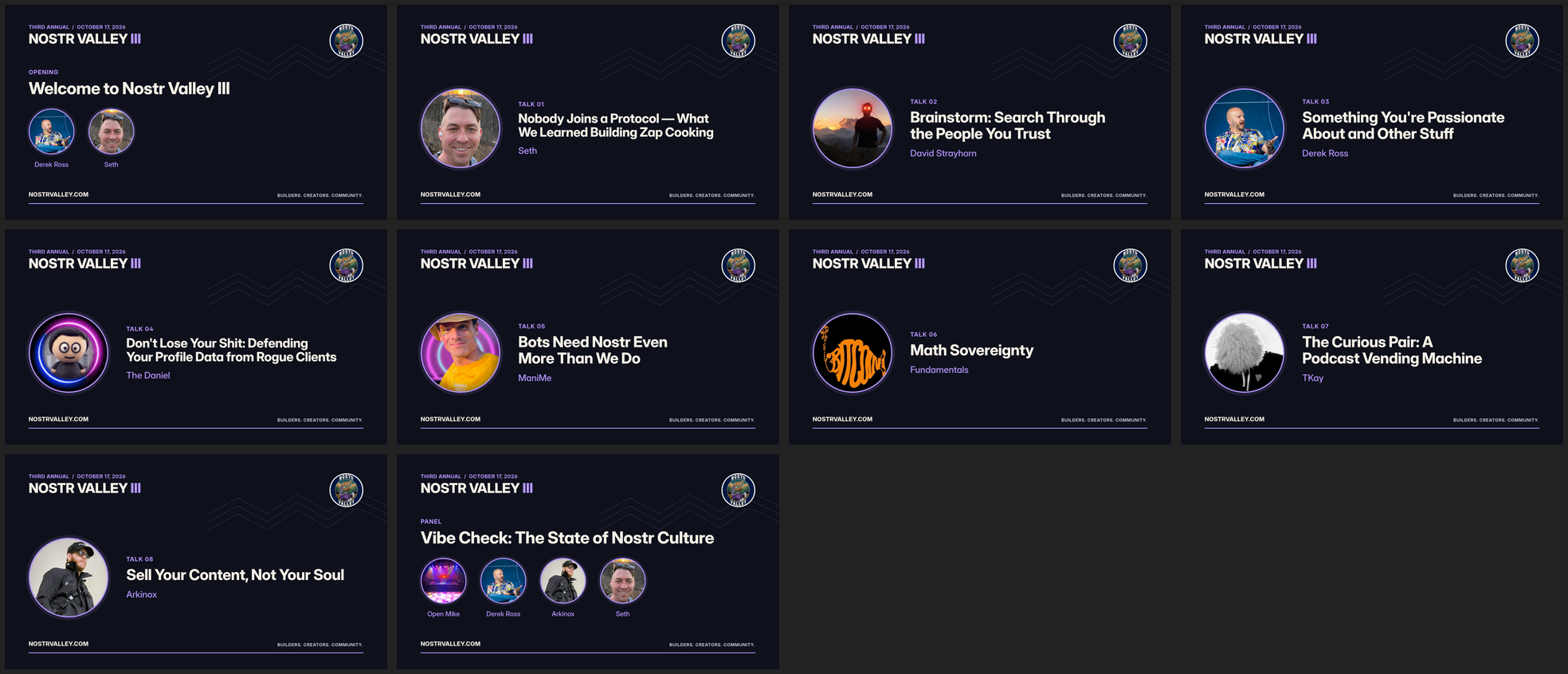
What I learned: if the information already exists somewhere (a website, a spreadsheet, Nostr profiles), let the AI pull it from there. You get no typos, and redoing everything is one command when something changes.
Step 3: Let the AI "watch" by reading
An AI can't sit and watch four and a half hours of video. It can read four and a half hours of transcript in a couple of minutes. So the core of the whole process was transcription.
Claude installed faster-whisper and wrote a 26-line script that pulls the audio out of each file and transcribes it with word-level timestamps, all onto one continuous timeline:
from faster_whisper import WhisperModel

model = WhisperModel("distil-large-v3", device="cpu", compute_type="int8")
segments, _ = model.transcribe(audio, language="en",
                               word_timestamps=True, vad_filter=True)
It ran a five-minute sample first to check speed and quality. The full 4.5 hours took 52 minutes on my laptop's CPU. Along the way the Whisper library hit an incompatibility with the audio decoding library that got installed. Claude read the traceback, worked around it by feeding the audio in directly, and kept going. I only found out because it told me.
What I learned: turning a media problem into a text problem is what makes AI useful here. Once there's a transcript, finding "where does David start talking" is a search, not a viewing session.
Step 4: Test the pipeline on one clip before running it on everything
While transcription ran, Claude wrote the render script and tried it on a 30-second test clip from the first talk. The first attempt failed twice: ffmpeg couldn't seek into the three joined files, and the crossfade filter refused to blend the card with the video because their internal timebases didn't match. Both fixes were one line each, and I didn't have to understand them.
Here's roughly what the final command does for each talk:
ffmpeg -loop 1 -framerate 30 -t 5 -i card.png \
  -f concat -safe 0 -ss 1274.5 -t 1296.5 -i joined.txt \
  -filter_complex "
    [0:v]format=yuv420p,settb=AVTB[card];
    [1:v]format=yuv420p,settb=AVTB[talk];
    [card][talk]xfade=transition=fade:duration=1:offset=4[v];
    [1:a]afade=t=in:d=1,adelay=4000:all=1,loudnorm=I=-16:TP=-1.5:LRA=11[a]" \
  -map "[v]" -map "[a]" -c:v h264_qsv -global_quality 21 \
  -c:a aac -b:a 192k 01-seth.mp4
In plain English: show the card for four seconds, crossfade into the talk over one second, fade the talk's audio in, normalize the loudness so every video plays at the same volume, and encode with the laptop's built-in Intel video encoder. joined.txt lists the three camera files with their durations, so ffmpeg treats them as one long video and a talk that crosses from one file into the next has no seam.
Claude pulled frames from the test clip to check the crossfade:

What I learned: always ask for a small test before the full run. A 30-second render takes 12 seconds. A broken full render wastes an hour.
Step 5: The human catch
This is the part I want people to pay attention to. The test clip used a placeholder end time based on the schedule. I watched the test outro and wrote back:
The Seth preview isn't actually Seth. The end of the clip shows David giving his Brainstorm talk. Does that matter?
It mattered. Claude pulled frames from both test clips and confirmed it: the intro was Seth, but the outro was already David, because the event had run ahead of schedule. If we had cut every video by the clock, every one of them would have ended with the next speaker's opening.
That's exactly why the plan was to cut from the transcript and not the schedule. But the AI's placeholder was wrong, and I was the one who spotted it. AI doesn't replace the person who was in the room. It needs one, at the points where a decision gets made.
Step 6: Find the real cut points
Once the transcript was done, Claude found the cuts in four passes:
- Silences. It listed every gap of 12 seconds or more with no speech. Speaker changes show up as long gaps (applause, walking up, plugging in a laptop).
- Handoff words. It read the transcript around each gap: "thank you," "who's up next," "please welcome," "hello everyone."
- Word-level timing. Where one transcript segment mixed two speakers, it used the per-word timestamps to cut between the last word of one and the first word of the next.
- Frames. It grabbed a frame from just inside every start and every end, labeled them, and put them all in one image:
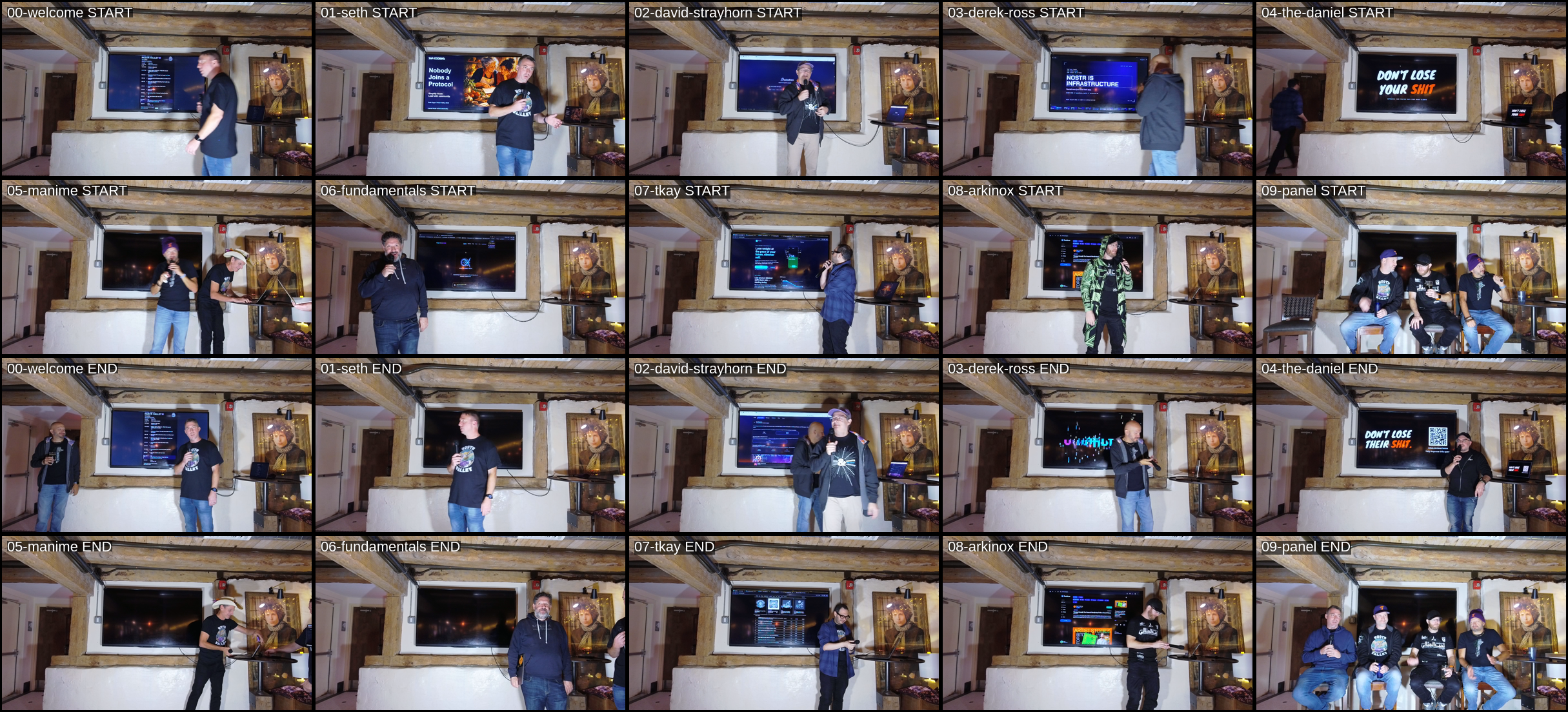
That frame check caught something the transcript didn't. At one talk's start, the person holding the mic wasn't the speaker. Someone in the audience was filling time with his own demo while the speaker fought with the HDMI connection. The transcript sounded like a talk, but the frames showed the wrong person. Claude read further, found the speaker's actual first words four minutes later ("Hey, Nostr. Sorry for the delay."), and moved the cut.
Then it gave me the cut list as a table: each talk's start and end, length, and first words, plus a command to open any cut in mpv for a spot check. It also listed the judgment calls it had made (trimming a mic check from the start of my own talk, ending a couple of talks on the speaker's final "thank you" because the next intro started within a second). I approved the list and it started the render.
What I learned: ask the AI to show its evidence. A frame grid and a table of first words took me two minutes to review, and that's what made me confident enough to approve ten videos without watching them.
Step 7: Render, caption and clean up
Before rendering, Claude fixed the names Whisper kept getting wrong. Whisper doesn't know our ecosystem, so "Nostr" came out as "Noster" and "Nostra," "Arkinox" as "Arcanox," "npubs" as "end pubs," and "Omarchy" five different ways. A short find-and-replace list fixed all of it in the transcript, so the captions came out clean.
Then the render ran in the background: ten videos at about five times realtime using the laptop's hardware encoder, roughly five minutes per 25-minute talk. Each video got a matching .srt caption file with timings shifted to account for the intro card.
Step 8: The transcript keeps paying off
Once you have a transcript, you have the raw material for everything that comes after the videos. With the videos rendering, I asked:
Since we have the transcripts, can you write a short summary file for each talk? I want descriptions I can use on YouTube and short posts for Nostr and X. Then use all of the transcripts to write a blog post recapping the whole event.
Claude read all ten transcripts and wrote, for each video, a summary, key points, a YouTube title and description with chapter timestamps, a Nostr post that tags the speaker's npub, and an X post. It also wrote a full event recap in my voice. The chapter timestamps came straight from the transcript and line up with the finished videos.
It also flagged what it couldn't verify: names it wasn't sure Whisper got right, a promo code from one talk, and a couple of claims from the stage that need a fact check before they go in anything public. I'd rather get a list of open questions than confident copy with mistakes in it.
Prompts you can use
Here are the prompts that did the heavy lifting, generalized so you can adapt them. Claude Code works best when it can see your files, so run it from a folder where it can reach your footage and any data about the event.
Planning:
I have [N] video files from [event] at [path]. The schedule and speakers are in [file/repo/URL]. I want each talk as its own video with [intro card / lower third / nothing] and [captions]. Look at the files and the schedule first. What tools would you use, what do I need to install, and what's your plan? Don't start editing yet.
Cards:
Make a 1920×1080 intro card for each speaker. Use their [Nostr profile / photo folder / headshots in X] and talk titles from [source]. Match the colors and fonts of [existing graphic]. Show me two samples before rendering all of them, then make a contact sheet.
Finding the cuts:
Transcribe the audio with word-level timestamps. Use the transcript to find where each talk actually starts and ends. Don't trust the schedule. Check a video frame at every cut and give me a table of start, end, length and first words so I can approve it.
Test first:
Before rendering everything, render a 30-second test of the intro and the last 10 seconds of one talk, and show me frames from them.
Captions and content:
Fix recurring transcription mistakes in names and terms (list: [...]). Then write a summary, YouTube description with chapters, and short social posts for each video. Flag anything you can't verify instead of guessing.
What I'd tell anyone trying this
- You don't need to know the tools. I still couldn't write that ffmpeg filter from memory. I didn't need to. I needed to know what I wanted and to check the result.
- Give it real data and let it look. It found facts I didn't know, like the camera clock lining up exactly with the schedule.
- Make it prove the work. Contact sheets, frame grids and tables are fast for a human to check. Ask for them.
- Stay in the loop at decisions. The design, the cut list and the final copy were my calls. The one real mistake in the process (the placeholder cut) was caught because I looked.
- Expect the transcript to get names wrong. Have it fix them before you publish captions.
- Plan for disk space and time. The raw footage was 40 GB and the finished videos about 20 GB. The SD card copy, transcription and rendering each take a while, but they run in the background.
- Keep the scripts. Everything Claude wrote (about 220 lines across four small scripts) is reusable. Next year's Nostr Valley is a new cut list and a new set of cards.
The Nostr Valley III videos are coming to YouTube soon. If you run a meetup or a conference and you've been putting off the videos, try it. The worst case is you spend an evening and learn how the pipeline works.